
On this page
Scanlily's delivery confirmation feature alerts you whenever QR stickers on your products or items are scanned. If you run a business where you deliver products or items to customers, you automatically know when they've been received!
If you run a business where you sell products or rent out equipment, you're probably familiar with how challenging it is to confirm customers received packages. Customers never let you know if they've received equipment, and it's days of 'did you get it?', or maybe a product got damaged in transit, and you only find out from a negative review on your company pages, or shipments sit in customer's dock for days, and you're already thinking they're lost.
There's either no direct line of communication or you're chasing for a response, and with traditional tools, you only get a 'delivered' prompt, but don't know for sure if the customer got their package in good shape.
Scanlily's QR labels solve these issues by letting you know instantly when the item is with the customer. And the best part? Customers can leave a detailed message for you. Here's how it works…
How Scanlily's QR-Based Delivery Confirmation Works
Vendor's POV
Add your item to Scanlily
First, you (the vendor) add the item or product you're sending out to your Scanlily account to create a digital record of it. You can choose to scan the Scanlily QR sticker you'll be placing on it first, then take a photo of the item or vice versa - capture it first, then attach the QR code to it by scanning the QR sticker.
After taking a photo of your item, you can let Scanlily's AI create a full description and category entry in seconds!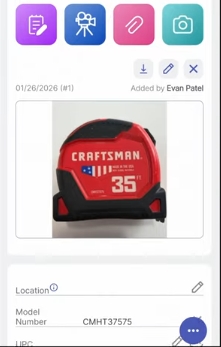
Place the QR sticker on the item
Place your Scanlily QR sticker on the product if you've not done so in a location that pops and is easy to see (ideally the top or the side)
Attach a 'Public message' to the QR sticker
On the Scanlily app, you can attach a public message that's displayed in the item page to anyone who scans the QR sticker. On the item page, check the 'Publicly viewable' box so your customer can see the item page and the information you've attached.
Now, click the three-menu bar at the top left and click 'Public Message(Scan If Found)'. On the next page, enter the message you want displayed to your customers and any contact information.
Send the item to your customer
With the Scanlily QR sticker attached, ship the item out to your customer.
Your Customer's POV: Scan, confirm, and communicate
Customer receives the tagged item
Once it lands, your customer receives the product or item with the QR sticker attached.
Customer scans the QR sticker (no app needed)
Since you've set the item page to publicly viewable, the customer only needs to scan the QR sticker with their phone camera for delivery confirmation without app downloads, and the item page pops up in their browser with the information and message you've attached.
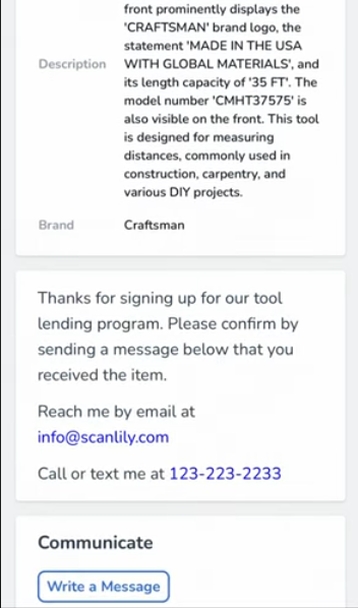
The delivery confirmation message you've attached also pops up, and the customer can decide to write you a confirmation message.
Customer left a message (optional)
If the customer clicks 'Write a message' they can send a quick message to you.
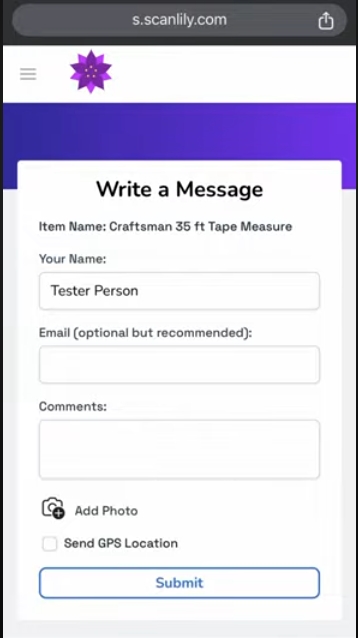
They can also attach a photo or even leave a GPS tag so you know exactly where the item was scanned and so you can confirm the condition.
Vendor's POV
Confirmation on scanning
As soon as the QR sticker is scanned, you will receive a notification in your Scanlily app. On the item page, you can also click on the three-dot menu at the bottom right and click 'History' and you'll see the 'Referenced from QR code' tag notifying you that it has been scanned.
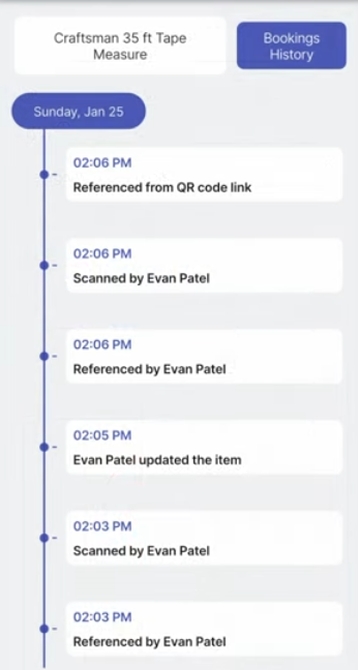
Confirm the customer's message
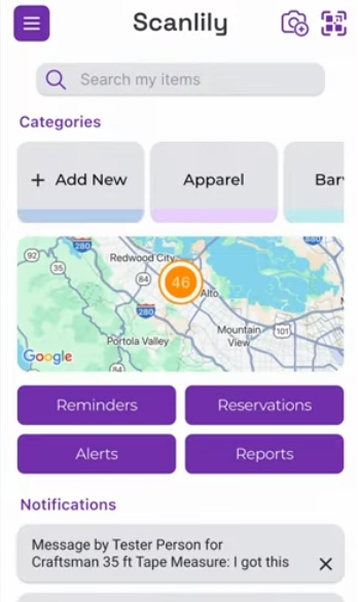
If the customer left a message, this is sent as an email and a notification in your Scanlily app, and if you have push notification permissions enabled, you'll see the pop-up in your notification screen.
Simply click the Scanlily app, and on the home screen, the new message will be at the bottom.
Customer delivery confirmation simplified!
Why do businesses need this right now?
Why traditional delivery tracking doesn't confirm customer receipt
Most traditional delivery notification systems only tell you 'delivered' by the driver, but you can't tell for sure if the item got to your customer and if it's in good condition. With Scanlily, the customer themselves scan the QR sticker and can leave a message plus an image for you to review and take any action quickly if needed.
Eliminate follow-up emails with automatic delivery notifications
Vendors have been relying on "Did you receive this?" emails that customers just ignore or forget to respond to. These follow-up calls waste time and eat into productive hours, and with no confirmation, vendors don't have peace of mind.
With Scanlily's automatic delivery confirmation system, automated notifications eliminate the need to send follow-up emails entirely, and customers can respond immediately while they're still excited to receive the item.
Capture customer feedback at the moment of delivery
Most vendors send satisfaction surveys days or weeks later, and these typically have low response rates since customers get too busy or are discouraged about filling out a lengthy form.
Plus, when feedback comes in, it's vague since they've forgotten some details. Scanlily allows you to capture feedback at the moment of receipt when the customer experience is 'fresh'.
B2B specific delays
For business-to-business deals, the receiving business may have departments dedicated to processing new orders, and items may sit in the receiving dock for days, and the vendor has no idea if the customer has received it,t plus the receiving company hasn't had time to check and doesn't know if they have it.
With Scanlily, the items only need to be scanned at the entrance by anyone, wherever they are in the customer's facility, and the vendor knows it's arrived!
How Scanlily compares to traditional delivery confirmation methods
Scanlily's QR code delivery confirmation is more affordable and convenient to use compared to traditional delivery confirmation methods like:
Carrier tracking services
Most businesses today use carrier tracking services like FedEx or UPS, or expensive delivery tracking software packed with features they'll never use. These traditional services give you a 'delivered' message when the package lands, but delivered doesn't automatically mean 'picked up'.
To use these services, you need to proactively check by logging in to their website or app, any confirmation is done by the driver (not the customer themselves), and these platforms don't give any direct vendor-customer portal.
Scanlily's QR-based approach solves this by ensuring customer-initiated confirmations (any alert you get means the customer has gotten it). What's more? You get notified instantly, and the customer can attach a GPS tag so you know where the customer was when they scanned it.
Proof of Delivery software
Some specialized proof of delivery software on the market today actually offers electronic proof of delivery that requires the driver to capture the signature of the customer, take photos, and also log their GPS locations.
However, the main issue is that these apps are designed for companies with their own delivery fleets. They're also super expensive, with plans typically between $500-600 per month, they're not integratable with third-party carriers, and setting them up usually takes time.
A proof of delivery for small business solution should be easily integrated and this is where Scanlily comes in. You only need to place Scanlily's QR stickers on your packages, and it doesn't matter which carrier you use. Plus, with plans starting at $9 USD/month, you're getting the most affordable confirmation solution on the market. There's also no app setup required, and customers only need to scan their packages with their phone cameras and communicate with you in-browser.
Email/SMS delivery surveys
If you send follow up email or SMS confirmations or satisfaction surveys a few days after to customers, you know too well how very rarely customers reply back.
First, you're sending these days after delivery when the customer may have forgotten important details. You're also giving your customer extra work, and they have to try to remember. Finally, if there was any damage to a product, the customer is more likely to contact support than respond to a survey.
With Scanlily, your feedback is instant, as the customer can send a message as soon as they open the item. By design, you also get higher response rates since it's much easier and quicker to scan the QR stickers that navigate through their emails and head to your website to answer survey questions. It also feels like a natural part of receiving the package and not an extra task!
Scanlily's QR-based pickup confirmation is designed for your real-life business
Whether you are an…
E-Commerce retailer
If you're shipping products to customers, you can attach QR stickers on packages and instantly get notified when they're scanned with custom messages like 'Love it! Do you have this in red?'
Equipment rental company
If you're renting cameras, tools, or event equipment out, Scanlily's QR labels on each equipment case let you know when they've arrived and also know the condition of items quickly since team members can send messages like 'Lens cap is missing' and you can quickly replace faulty or missing stuff.
Simplify your pickup confirmation with Scanlily today!
FAQs
Q: Do customers need to download an app to scan Scanlily QR codes?
No. Scanlily's QR stickers can be scanned by anyone with any smartphone camera. Customers just point their camera at the code, and it opens in their web browser. Vendors can set the item page (on Scanlily) as 'Publicly viewable' and it becomes public.
Q: How does this work with FedEx, UPS, or USPS shipments?
Scanlily QR stickers work with any shipping carrier. Just attach the sticker to your package before shipping, and customers can scan it when they receive it. Even if the customer doesn't leave a message, simply scanning the QR label sends a notification to you.
Q: How much does Scanlily cost?
Scanlily plans start at $9 USD/month for small businesses, and there are no per-user fees or expensive enterprise requirements. Scanlily allows you to scale your plans based on the number of items you're tracking versus the number of users in your company.