It’s simple, really. Inventory work is boring work. Ask anyone who's ever had to create an inventory: a friend who’s moving house, a warehouse manager, or the owner of a business that handles physical products or runs on physical gear and they'll tell you the same thing: it's tedious, time-consuming, and often it never gets finished.

But what if you could just walk around with your phone, recording a video of items you want to organize, and AI automatically creates a complete, organized inventory, capturing even items that are hidden? That's exactly what Scanlily's new AI video recording does. But first…
How AI Video Recording Changes Everything
Scanlily has just launched a way for you to catalog items or containers in seconds without needing to battle spreadsheets or take photos of each item one after the other.
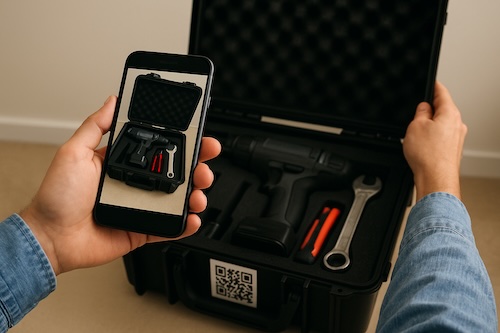
Instead, you record a video of an item or items you want to put in a container while talking naturally about what you see, and the AI does three things simultaneously:
Watches Your Video
Scanlily’s AI will analyze every frame to identify individual items and then extract clear photos automatically. Our AI will capture multiple angles of each object so you can choose the best one later, and it can also tell separate items apart even if they are jumbled together!
Listens to Your Voice
As you’re recording the video, Scanlily AI will also listen to your voice and convert your speech to text in real-time. So, for boxes containing items inside, you can say "there are 100 Band-Aids in this box," and the AI will understand that you mean the quantity in the captured item.
Scanlily AI also captures sentimental qualities and descriptions like "this was made by my grandfather". So whether it’s that stunning tablecloth, crocheted with impossibly fine thread by a great-grandmother we never met, or grandpa’s worn-out leather satchel, the AI will capture the story behind it.
You can also give commands like "catalog these plates as duplicates" so that it doesn’t make multiple entries for similar items.
Organizes Everything Automatically
Once you’re recording a video of your items, Scanlily’s AI will create individual item entries from the video. For each item, it’ll write detailed descriptions (including any unique qualities you spoke about), attach the images, and also create dozens of fields for ‘price’, ‘location’, etc.
Scanlily’s AI will also group duplicate items when you mention them and then name the container based on its contents. Finally, you can then place your Scanlily QR sticker on the container after you’ve closed it, and anyone who scans it with their phone will see the list of all the items inside with photos attached!
Who is Scanlily’s AI Video recording for?
Scanlily’s AI video recording is the best and most useful inventory management tool for anyone who needs quick organization. These are just a few of its applications, but if you are:
A mover
Let’s say you’re moving across states with 40 boxes. You can record a video of the contents of each box before sealing them and add each one as a Scanlily container in your Scanlily app.
Whoever is helping you move can then scan the QR sticker on the box to know which boxes are fragile or know which boxes to take to the kitchen, your home office, etc.
A small business owner
Let’s say you run a photography business with gear across multiple locations. You can record a video(s) of each equipment case at each location and create separate Scanlily containers with tags like "Studio A Equipment," "Studio B Equipment," or "Field Kit".
You can then search "Canon lenses" in the Scanlily app to see which containers have them and check each container's details to see its location. Now, you know which case to grab or have an assistant retrieve.
A warehouse manager
Let’s say you manage inventory for an e-commerce business, and your new shipments are currently being cataloged by recording incoming pallets. With Scanlily, you can use your voice to capture SKU numbers and quantities.
Your staff can scan containers to see what’s inside and their quantities without needing to unpack. Suddenly, the stocktaking that used to take 3 days now takes 3 hours.
Cataloging family items
Finally, let’s say you’re cataloging a late family member’s workshop or collection. You can record items while narrating the story behind them, e.g., "Dad bought this in 1985".
Scanlily’s AI video allows you to preserve family history while taking inventory practically. High-value items and collectibles can also be split fairly because they’re documented clearly. And if you have an appraiser far away, they can review your family's inventory remotely via photos.
Getting Started - Create your first Scanlily container!
You can cut the hours you’ve been sinking into cataloging your inventory into mere minutes. Now, gather some items you deal with frequently and pick up your phone:
Step 1: Select or create a container
Open the Scanlily app on your phone, head to ‘My containers’ and select an existing container or select the upper right QR or Camera+ buttons to create a container with or without a QR code, respectively. Then open that container.
Step 2: Record a video
In the container, select "Add Without QR" to add items to it without QR codes.
Select ‘Video’ and hit record as you walk through your items. Describe what you see naturally as you film. Each video can be up to 1 minute and you can record multiple.
Step 3: Review and Approve the items
Scanlily’s AI will process the video in about 30-60 seconds. Now, check the Scanlily container to see all the items and edit any details if you need to. Click on each draft item and approve it once you’re satisfied.
Your inventory management just got transformed!
Before now, you probably used hours to type or generate descriptions, had incomplete inventories that you never finished, and an unhealthy number of mystery boxes labeled "misc". Or you’ve lost or wasted money buying items you later discovered you already had.
With Scanlily’s AI Video Recording, you can now catalog your inventory in incredible detail in minutes by recording videos of your items naturally. And once you attach a Scanlily QR sticker to your container, all its contents are visible to anyone.
Technology should make tedious tasks effortless, not replace one manual process with another slightly less manual process. And that’s what Scanlily AI video just did for your inventory!