Encircle is discontinuing their free Encircle inventory product on December 17, 2025. After this date, your data will be inaccessible. If you're an Encircle user looking for an alternative, read on to learn how Scanlily offers a powerful upgrade with more features.
What is the Encircle Home Inventory App and What's the Latest News?
The Encircle Home Inventory app was a free tool designed to help homeowners document their belongings for insurance purposes, serving as a basic digital inventory. It allowed users to create basic inventories, primarily for potential insurance claims. However, Encircle has announced the discontinuation of this free product, effective December 17, 2025, after which all user data was set to become inaccessible.
If you've been using Encircle's Home Inventory app, you've likely received the Encircle app news: Encircle is ending support for their free home inventory product to focus on their paid restoration contractor services. After December 17, 2025, users were no longer be able to access data through the app.
This leaves thousands of users searching for a reliable alternative to protect their home inventory documentation. The good news? This might be the perfect opportunity to upgrade to a more capable solution that goes beyond basic insurance documentation.
Why Encircle Is Shutting Down Home Inventory
Encircle was originally built for restoration contractors and insurance professionals who need to document property losses after disasters like fires and floods. The free Encircle home inventory app was a side product - useful for homeowners creating basic documentation for insurance claims.
However, Encircle has made the business decision to focus entirely on their paid B2B products for restoration contractors, leaving consumer users without a home. This reveals a fundamental limitation: Encircle was never designed to be a comprehensive home and asset management system. It was insurance documentation software repurposed for consumers.
If you've been using Encircle, you've probably noticed some of these limitations:
- Insurance-first design: The app was optimized for documenting losses, not for everyday organization, finding items, or managing your belongings actively.
- Limited photos per item: Many users report frustration with being limited to one photo per item (plus a receipt photo), making it difficult to fully document item condition.
- No location tracking within rooms: Users frequently requested the ability to track items within boxes or specific storage containers, but this feature never materialized.
- Manual data entry: Every item description, category, and detail had to be typed manually, making the cataloging process tedious.
- App-required access: Everyone who needed to view or update inventory had to download the app, limiting family member participation.
The discontinuation is disappointing but unsurprising. Products built as afterthoughts rarely receive the development attention users deserve. Now is the time to move to a solution designed from the ground up for comprehensive inventory management.
What to Look for in an Encircle Alternative
When evaluating alternatives to Encircle, consider what you actually need from an inventory system - not just what Encircle provided, but what you wished it could do:
- Long-term reliability: Choose a company committed to their inventory product, not one that treats consumers as an afterthought.
- Easy cataloging: Look for AI-powered image recognition that eliminates tedious manual data entry.
- Flexible organization: True container nesting that mirrors how you actually store things - boxes within closets within rooms.
- Multiple photos and attachments: Unlimited photos, documents, and notes per item for complete documentation.
- Easy access: Browser-based access so family members can participate without downloading apps.
- Data portability: Full export capabilities so you're never locked into a platform again.
- Beyond insurance: Features for everyday use - finding items, tracking locations, managing equipment.
Why Scanlily Is the Best Alternative to Encircle
Scanlily addresses every limitation that frustrated Encircle users while adding powerful capabilities that transform how you manage your belongings. Here's why Scanlily is the natural upgrade path.
AI-Powered Speed
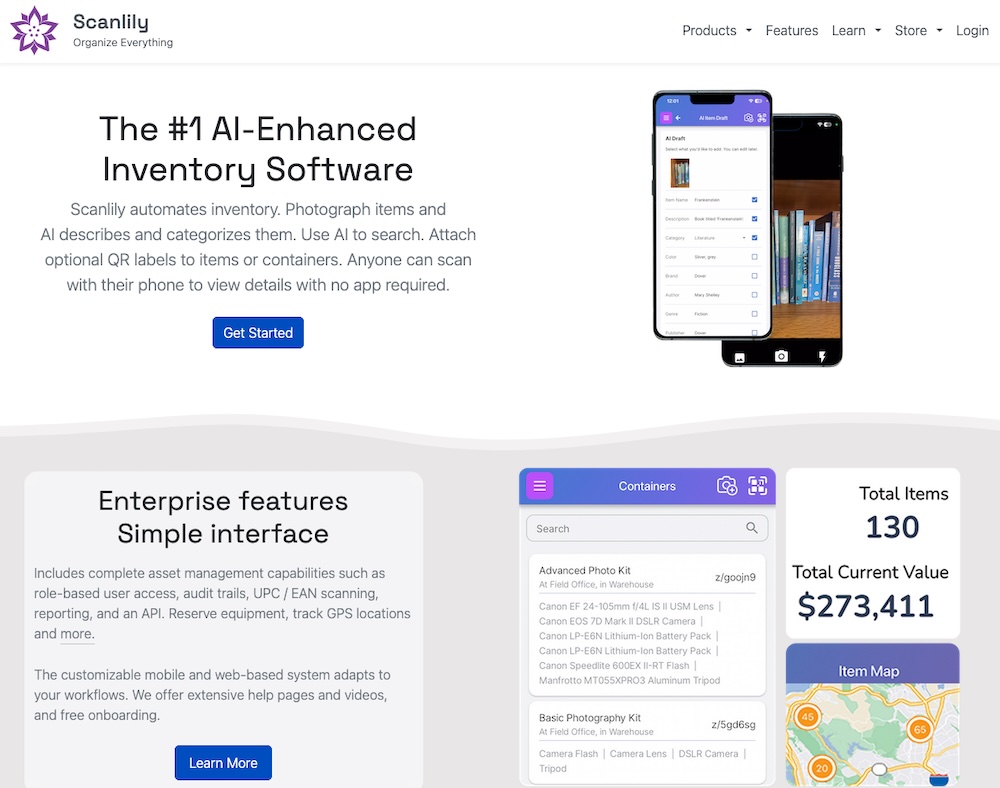
Remember spending hours typing item descriptions into Encircle? Scanlily's AI image recognition changes everything. Simply take a photo, and Scanlily automatically identifies the item, writes a detailed description, and suggests appropriate categories. You can catalog hundreds of items in minutes rather than hours.
Even better, Scanlily can identify multiple items from a single photo. Snap a picture of a toolbox, a bookshelf, or a kitchen drawer, and Scanlily will catalog each item it sees. This makes building your new inventory remarkably fast - many users find that re-cataloging with Scanlily takes a fraction of the time it originally took with Encircle's manual entry.
True Container Organization
One of the most requested features Encircle users asked for was better location tracking within rooms. Scanlily delivers with true container nesting:
- Create digital containers for boxes, bins, shelves, and closets
- Nest items within containers, containers within rooms
- Scan a container's QR code to instantly see everything inside
- Move containers and all their contents update automatically
This mirrors how you actually organize your home. When you're looking for your camping gear, you don't just want to know it's "in the garage" - you want to know which bin, on which shelf.
Unlimited Documentation
Where Encircle limited you to one photo plus a receipt, Scanlily offers unlimited attachments per item. Add as many photos as you need to document condition from every angle. Attach receipts, warranties, manuals, and any other documents. Record audio notes for quick updates. Even attach video for items that need demonstrated functionality.
Every attachment is automatically timestamped and attributed to the user who added it, creating a complete audit trail for insurance purposes.
App-Free Access
With Encircle, everyone in your household needed to download the app to participate. Scanlily takes a different approach: anyone can scan a QR code with their phone's camera and instantly view item information in their browser. No app installation, no account creation, no training required.
This makes Scanlily practical for entire families. Your spouse can check what's in a storage box. Your kids can mark items as borrowed. Your elderly parents can access their inventory without struggling with new software.
Natural Language Search
Encircle's search required exact name matches. Scanlily's AI-powered search understands natural language queries like "show me electronics in the basement" or "find winter clothes." You can even photograph an item and ask Scanlily to locate it in your inventory.
Built for the Long Term
Unlike Encircle's consumer product, Scanlily is our core business. We're actively developing new features, responding to user feedback, and committed to the platform for years to come. Your data won't become inaccessible because we decided to focus elsewhere.
Moving from Encircle to Scanlily
Before Encircle shuts down on December 17, 2025, make sure to export your data. Encircle allows you to download PDF reports, Excel spreadsheets, and media files from their web app.
Need help bringing your Encircle data into Scanlily? Our Ultra plan ($35 USD/month, no annual commitment required) includes migration support. Simply contact us with your Encircle export and we'll help get you set up.
Even if you prefer to start fresh, Scanlily's AI-powered cataloging makes rebuilding your inventory surprisingly fast. Many users complete their entire home inventory in a single weekend - something that took weeks with Encircle's manual entry.
Choosing the Right Solution: Scanlily vs. Encircle Comparison
Here's how Scanlily compares to what Encircle offered:
| Feature | Scanlily | Encircle Home Inventory |
|---|---|---|
| Product Status | Active development, core product focus | Discontinued December 17, 2025 |
| Speed of cataloging | AI image recognition auto-identifies and describes items from photos | Manual data entry for every field |
| Photos per item | Unlimited photos, videos, and attachments | Limited to 1 item photo + 1 receipt photo |
| Container organization | True nested containers - items in boxes in closets in rooms | Room-level organization only; no box/bin tracking |
| Access method | Browser-based QR scanning; no app required to view or update | App installation required for all users |
| Search capabilities | AI natural language search ("find electronics in garage"); photo-based search | Basic keyword search; exact matches required |
| QR code workflow | QR-first design; scan code → snap photo → done | No QR code functionality |
| GPS location tracking | Items automatically geotagged when scanned; map view available | No GPS tracking |
| Custom fields | Unlimited custom fields with 5 data types | Fixed fields only; no customization |
| Primary design focus | Everyday organization, finding items, and asset management | Insurance loss documentation |
| Equipment booking | Built-in reservation system with calendar sync | Not available |
| Data export | Full ZIP backup with all images, attachments, and metadata | PDF and Excel reports; separate media download |
| Audit trail | Complete log of who changed what and when | Limited change tracking |
| UPC barcode lookup | 550+ million product database | Not available |
Beyond Insurance: What You Can Do with Scanlily
While Encircle was built primarily for insurance documentation, Scanlily serves as a complete home and asset management system. Here are use cases that go beyond what Encircle offered:
Moving and Storage
Moving to a new home? Create containers for each moving box, photograph contents as you pack, and generate QR codes to stick on boxes. When you arrive, scan any box to see exactly what's inside without opening it. This eliminates the "which box has the coffee maker?" problem entirely.
Finding Lost Items
Can't remember where you put something? Use natural language search or photograph a similar item to find it in your inventory. Scanlily tells you exactly which container, shelf, or room holds what you're looking for.
Lending and Borrowing
Track items you've lent to neighbors or borrowed from friends. Scanlily's equipment booking features let you mark items as checked out and set return reminders.
Estate Planning
Create a comprehensive inventory of valuable items with photos, appraisal documents, and provenance information. The audit trail documents when items were added and any changes made over time.
Home Maintenance
Attach maintenance records, warranty information, and service schedules to home equipment. Set reminders for filter changes, inspections, and other routine maintenance.
Get Started Today
Don't wait until December 17 to find an alternative. Start exploring Scanlily today and see how much faster inventory management can be with AI-powered cataloging.
With Scanlily's AI assistance, building your inventory is faster than you expect. Many users complete their entire home inventory in a single weekend - something that took weeks with Encircle's manual entry.
Join the thousands of users who have discovered that inventory management can be fast, intuitive, and actually useful for everyday life. Scanlily isn't just a replacement for Encircle - it's a significant upgrade that will change how you organize and manage everything you own.
Ready to make the switch? View our plans or contact us to learn about migration support for Encircle users.
Appendix: Complete Feature Comparison
| Feature | Scanlily | Encircle Home Inventory |
|---|---|---|
| Product Status | ✔ Active development; core business focus | ✗ Discontinued December 17, 2025 |
| AI Image Recognition | ✔ Automatically identifies, describes, and categorizes items from photos; catalog multiple items from one image | ✗ No AI recognition; manual data entry required |
| Natural Language AI Search | ✔ Conversational queries ("show me tools in the garage") and photo-based search | ✗ Basic keyword search only; exact matches required |
| UPC/Barcode Lookup | ✔ 550+ million product database | ✗ No barcode lookup |
| App-Free QR Access | ✔ Anyone can scan QR codes via phone camera and view/update through browser - no app needed | ✗ App installation required for all users |
| QR Code Generation | ✔ Unlimited, free (Business tier) | ✗ No QR code functionality |
| Equipment Booking System | ✔ Three modes: Checkout, Reservation, Reservation with Pickup; calendar sync; digital signatures | ✗ No booking or reservation functionality |
| Web Calendar View | ✔ Visual calendar with color-coded overdue alerts | ✗ No calendar view |
| Attachments | ✔ Unlimited notes, images, documents, audio files; timestamped with user attribution | Limited to 1 item photo + 1 receipt photo per item |
| Video Recording | ✔ Record videos directly in attachments (Pro/Business) | ✗ No video recording |
| Audit Trail (Change History) | ✔ Complete log of who changed what and when | Limited change tracking |
| Multi-Site Transfer Baskets | ✔ Automatic quantity adjustments at source/destination; consumable tracking | ✗ No transfer functionality |
| GPS Tracking & Mapping | ✔ Interactive maps; automatic location updates on scan | ✗ No GPS or mapping |
| True Container Nesting | ✔ Unlimited nesting; items in boxes in closets in rooms | Room-level organization only; no box/bin tracking |
| Custom Fields | ✔ Unlimited (Pro/Business); 5 data types | ✗ Fixed fields only |
| Automation (Triggers) | ✔ If-then rules auto-update fields based on conditions | ✗ No automation |
| Custom Notifications | ✔ Full message customization with dynamic fields | ✗ No notification customization |
| User Roles | ✔ 7-tier hierarchy with granular permissions | Single user or basic sharing |
| Data Export/Backup | ✔ Full ZIP backup with images, attachments, metadata, and organized folders | PDF and Excel reports; separate media export |
| Reports | ✔ Dozens of report types (PDF, Excel, CSV); allocation, utilization, depreciation | Basic PDF and Excel reports |
| API Access | ✔ REST API included (Business tier) | ✗ No API for consumers |
| Primary Use Case | ✔ Everyday organization, finding items, asset management | Insurance loss documentation |
| Pricing | ✔ Powerful Free version. Affordable paid plans starting at $9 USD/mo; no annual commitment | Was free (now discontinued) |
| Deployment Time | ✔ Minutes; AI-assisted cataloging | Hours of manual data entry |